
Getting Started with Earn Rule Groups
Overview
An Earn Rule is a type of Rule within the Loyalty platform that specifies Metric adjustments for Members performing different Activity Types.
Earn Rules are organized into Earn Rule Groups, which are used to define the desired outcome in scenarios where multiple Earn Rules apply for an Activity Type.
Earn Rule Group Strategies
The platform supports three different types, or "strategies," of Earn Rule Groups. Each of these strategies are described below.
Sum all Applicable Rules
With the Sum All Applicable Rules strategy, the results from all applicable Earn Rules within the Earn Rule Group are summed to calculate the final Metric adjustment.
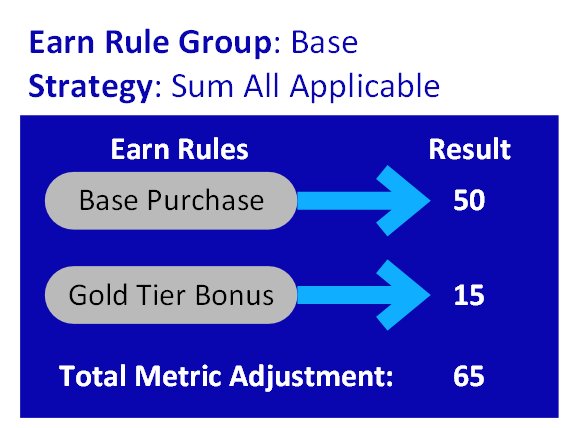
For example, the following diagram depicts a scenario where an Earn Rule Group named Base has two Earn Rules in it: Base Purchase and Gold Tier Bonus. Both Earn Rules execute when a Member performs a Purchase Activity Type. The Earn Rule Group has been assigned the "Sum All Applicable Rules" strategy, so the platform will sum together the results from both Earn Rules, and apply that sum to the Member.
In the below example, the Member has made a Purchase that earns them 50 Points from the Base Purchase Earn Rule, and another 15 Points from the Gold Tier Bonus Earn Rule. This Member will earn a total of 65 Points from this Purchase.
Use Best Rule Result
With the Use Best Rule Result strategy, the best result among all applicable Earn Rules from this Earn Rule Group is used as the final Metric adjustment. For accrual Earn Rules, the highest value is assumed to be the best result.
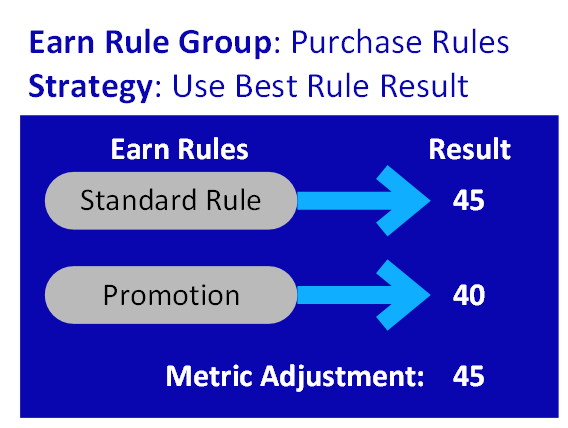
For example, the following diagram depicts a scenario where an Earn Rule Group named Purchase Rules has two Earn Rules in it: Standard Rule and Promotion. Both Earn Rules execute when a Member performs a Purchase Activity Type. The Earn Rule Group has been assigned the "Use Best Rule Result" strategy, so the platform will evaluate each Rule independently, and apply the highest result to the Member.
In the below example, the Member has made a Purchase that earns them 45 Points from the Standard Rule Earn Rule, and 40 Points from the Promotion Earn Rule. This Member will earn the 45 Points from the Standard Rule, as that is the highest (i.e., best) result.
First Applicable Rule
With the First Applicable Rule strategy, the result from the first applicable Earn Rule within the Earn Rule Group, whose Condition evaluates to True, is used as the final result. The sequence is based on the position of the Earn Rules on the Earn Rules screen. See Rearrange Earn Rules for details on how to establish this sequence.
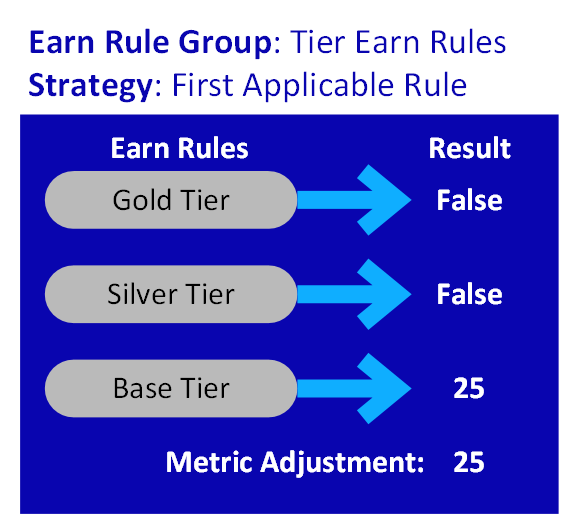
For example, the following diagram depicts a scenario where an Earn Rule Group named Tier Earn Rules has three Earn Rules in it: Gold Tier, Silver Tier, and Base Tier. All three Earn Rules execute when a Member performs a Purchase Activity Type. The Earn Rule Group has been assigned the "First Applicable Rule" strategy, so the platform will evaluate each Earn Rule in the sequence defined on the Earn Rules screen, starting at the top. If an Earn Rule's Condition evaluates to False, the platform continues on to the next Earn Rule in the sequence.
In the below example, the Member has made a Purchase, so the platform executes the first sequential Earn Rule, Gold Tier. In this example, the Member does not meet the Conditions defined for this Earn Rule, so the platform moves to the second sequential Earn Rule, Silver Tier. Likewise, the Member does not meet the Conditions defined for this Earn Rule, so the platform moves to the third sequential Earn Rule, Base Tier. The Member does meet the Conditions for this Earn Rule, so the platform uses the result calculated from this Earn Rule (in this example, 25 Points).
Combining Earn Rules Groups
As described above, the platform allows you to define the strategy to apply when multiple Earn Rules within an Earn Rule Group execute. In addition, the platform also lets you define the strategy to apply when Earn Rules across multiple Earn Rule Groups execute. See Working with Earn Rule Group Combinations for more information.
Access
The Earn Rule Settings screen is used to view, create, and manage the Earn Rule Groups in your loyalty program. To access the Earn Rule Settings screen, select Rules from the top navigation menu, then select Settings > Earn Rule Settings from the side navigation menu.
Quick Links
 Create an Earn Rule Group Create an Earn Rule Group |
 Delete an Earn Rule Group Delete an Earn Rule Group |
 Working with Earn Rule Group Combinations Working with Earn Rule Group Combinations |
